
The Microsoft 365 Settings Nobody Turned On
A default tenant is configured for compatibility, not security. Ten settings worth checking, and the questions to ask whoever administers yours.

A default tenant is configured for compatibility, not security, and the highest-impact improvements available to most companies cost nothing beyond the licence they already hold. Almost everything that makes Microsoft 365 secure is switched off, or set permissively, out of the box — because Microsoft ships defaults that work for everyone rather than defaults that are right for anyone. This article reflects Microsoft 365 defaults and configuration as of October 2026; Microsoft changes defaults periodically, and newer tenants differ from older ones — which is itself part of the point.
The previous articles covered which tier to buy and what you're paying twice for. This one is the gap between owning capability and having it do anything — the most directly actionable in the series: a reader should be able to hand it to whoever administers their tenant and get specific answers.
See how your IT actually stacks up.
Twelve questions, about four minutes, and your score appears on screen immediately — no sales call required.
Why are the defaults like this?
Defaults have to work for a two-person company and a multinational, on modern and legacy systems, without breaking anything on day one. That necessarily means permissive. The configuration is the customer's job, and most tenants were set up once by someone in a hurry and never revisited. Microsoft isn't negligent for shipping permissive defaults; they'd be reckless to ship strict ones that locked a percentage of new customers out of their own mail on day one. The cost of that caution is a tenant that works out of the box and is exposed the moment someone comes looking.
What is Secure Score and why should you look at it?
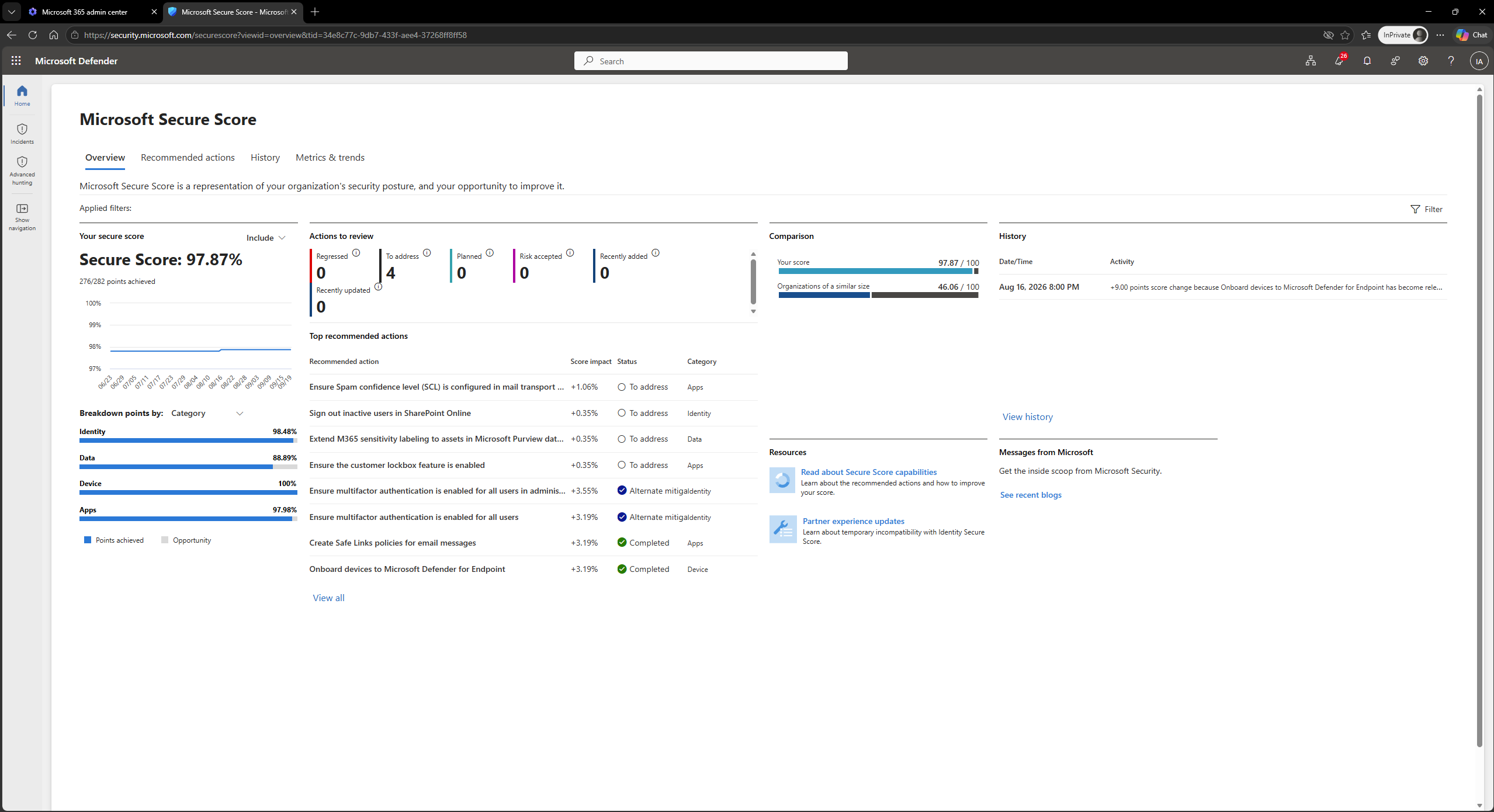
Start here because it's the one thing a non-technical reader can check themselves. Secure Score measures how many recommended security controls are in place across the tenant and expresses it as a percentage of the available points. It isn't a perfect measure — chasing the number for its own sake is a mistake, because some recommendations don't suit every business. What matters is the trend and the specific recommendations beneath it: a list of exactly what's off, what it would do if it were on, and how much each one is worth. Open it, read the list, and you'll know what's not done before you ask anyone.
Microsoft Secure Score, September 2026. Benchmark figure is Microsoft's own comparison against organizations of similar size.
The settings worth checking
1. Multi-factor authentication and security defaults
Security defaults — a baseline that enforces MFA and blocks legacy authentication — are on by default in a new tenant. In an older tenant created before they existed, they're frequently still off, and those tenants are the exposed ones. The distinction matters: security defaults is a one-click baseline; conditional access is the policy engine that lets you tune who, where and when. If you're on Business Premium or above, conditional access replaces security defaults; if you're not, security defaults is the floor. Either way, the question is whether MFA covers every account with no exceptions.
2. Conditional access
What it does, in business terms: decide whether a sign-in is allowed based on who the user is, where they're signing in from, what device they're on, and how risky the sign-in looks. Blocking sign-ins from unexpected countries, requiring a managed device, stepping up authentication for a risky sign-in — all conditional access. It is the single biggest security improvement available in most tenants, and it requires Entra ID P1 (Business Premium, E3, E5). Most companies that hold that licence never configure a policy. If you read one section of this article, read this one.
3. Legacy authentication
Older protocols — basic authentication in Exchange, IMAP, SMTP without modern auth — don't support MFA at all, so they bypass it entirely. Microsoft has been retiring these, but they're often still enabled in older tenants, and the reason is usually that something depends on them: an old scanner sending scans by email, a line-of-business app that hasn't been updated, a service account on a script. The right sequence is to find what still uses legacy auth first — conditional access has a report-only mode — deal with the dependencies, then block it. Blocking before you've found the dependencies is how a printer quietly stops working and nobody connects it to the change.
4. Mailbox auditing and sign-in logs
Mailbox auditing and the unified audit log are on by default now — they weren't always — but the default retention is short. When you're trying to establish what happened during an incident three months ago, short retention is the same as no log. E5 includes a year and more; lower tiers keep days. If you have E5 or the Purview Audit add-on, check the retention is set to use it. If you don't, know the window you're working in.
5. External sharing settings in SharePoint and OneDrive
The defaults are permissive: in many tenants, anyone with the link can access a file a colleague shared, and most companies don't know what's currently shared externally. SharePoint external sharing can be tuned per site, and there's a report that lists what's shared — use it. The setting most worth checking isn't the policy, it's the inventory: what's out there right now.
6. Email authentication — SPF, DKIM and DMARC
For your own domain: SPF, DKIM and DMARC are the DNS records that tell receiving mail servers your mail is really yours. Sending domains without them get spoofed. SPF and DKIM are usually set up at migration and then forgotten. DMARC is usually left at none and never reviewed, which means the records that are set up aren't actually being enforced. Setting DMARC to quarantine or reject — after monitoring — is one of the cheapest, highest-impact email security changes available, and it's free.
7. Anti-phishing and impersonation protection
The specific settings covering lookalike domains and executive impersonation — the attacks that actually succeed against a real business — are off or minimal by default. Anti-phishing policies in Defender for Office 365 include impersonation protection for your domains and your senior people, mailbox intelligence, and first-contact safety tips. They sit at Plan 1 in Business Premium and Plan 2 in E5. In most tenants that hold the licence, the policy exists with the defaults and was never tuned.
8. Retention and deletion policies
By default, a departed employee's mailbox and OneDrive sit there indefinitely unless someone acts — which is both a compliance issue (data kept longer than it should be) and a licence-cost issue (a mailbox on a retained licence that nobody is using). Purview retention policies let you set what happens automatically — keep for a period, then delete, or just delete. Basic retention is in Business Premium and E3; advanced (records management, legal hold beyond the basics) in E5. Decide what should happen to a departed user's data before the person leaves, not after.
9. Device compliance policies in Intune
Intune is licensed in Business Premium and above and deployed far less often than it's licensed. A basic device compliance policy — encrypted disk, a supported OS version, a screen lock — is the minimum that makes “is this device allowed to sign in?” a question with an answer. Most companies that hold Intune enrol devices and then configure nothing, which is the same as not enrolling them for security purposes.
10. Sensitivity labels
Sensitivity labels classify and protect documents by label — internal, confidential, restricted — and can encrypt, watermark, and control sharing based on the label. They're powerful and almost nobody deploys them, for an honest reason: they require thought about your data before they're useful. Labels that aren't mapped to how the business actually handles information are noise. Worth doing, but worth doing properly, and not the first thing on this list.
What to do if you have no internal IT
Not everything at once. A sequence, before anything else: check Secure Score; confirm MFA covers everyone; disable legacy authentication; review external sharing; set DMARC. Those five are the high-impact, low-risk end of the list, and most can be done in an afternoon by someone who knows where the controls are. If you have no internal IT, the practical move is to bring in someone who does for exactly this scope — not a programme, a short engagement with a defined list and a report at the end.
What to ask whoever administers your tenant
- 1.What's our Secure Score, and what was it six months ago?
- 2.Is MFA enforced on every account, with no exceptions?
- 3.Is legacy authentication disabled?
- 4.What's currently shared externally?
- 5.Is DMARC set to anything other than none?
- 6.Which of the features in our licence tier are actually deployed?
These are the questions, verbatim. The answers tell you whether the platform you're paying for is doing the work it's capable of.
Why this doesn't get done
Stated without rancour: configuration is unbillable work with no visible output, and nothing breaks if it isn't done — until it does. There is no event that tells you your conditional access policy was never created; there's only the incident that wouldn't have happened if it had been. That's the asymmetry, and it connects to the argument in the cyber insurance article: insurers now ask whether MFA is enforced precisely because most of the time the answer is “we thought so.” The work that prevents the claim is the work that has no champion.
The settings worth checking, mapped
| Setting | Typical default | Why it matters | Tier required |
|---|---|---|---|
| MFA / security defaults | On in new tenants, off in older ones | Older tenants are frequently the exposed ones | All tiers (security defaults); conditional access needs Business Premium / E3 / E5 |
| Conditional access | No policies configured | The single biggest security improvement in most tenants | Business Premium / E3 / E5 |
| Legacy authentication | Enabled, often blocked only later | Bypasses MFA entirely | Conditional access (Business Premium / E3 / E5) or security defaults |
| Mailbox auditing & sign-in logs | On by default, short retention | You can't investigate what you didn't keep | All tiers; longer retention in E5 |
| External sharing (SharePoint / OneDrive) | Permissive by default | Most companies don't know what's shared externally | All tiers |
| Email authentication (SPF/DKIM/DMARC) | DMARC usually at none | Sending domains without it get spoofed | All tiers (DNS) |
| Anti-phishing & impersonation | Off or minimal by default | Covers the attacks that actually succeed | Business Premium (P1) / E5 (P2) |
| Retention & deletion policies | Nothing happens automatically | Compliance and licence-cost issue | Business Premium / E3 / E5 |
| Intune device compliance | Devices enrolled, nothing configured | “Is this device allowed?” has no answer | Business Premium / E3 / E5 |
| Sensitivity labels | Not deployed | Require thought about data before they're useful | Business Premium / E3 / E5 |
The current Microsoft 365 documentation is authoritative for what each setting does and changes over time.
None of this needs a bigger licence
None of this needs a bigger licence or a new product. It needs someone whose job it is to have looked — which is the work most providers skip, and the reason a tenant set up once and never revisited is the most common thing in the field. If you want that look done properly, our Microsoft 365 migration and tenant hardening service is built around exactly this audit.
Frequently asked questions
Don't see your question? Email info@isectra.com and we'll answer it directly.
Brian Martins is Chief Technology Officer at iSectra. He administers Microsoft 365 tenants for clients and has moved more companies down a tier than up one.
Continue the series


Get the next post in your inbox.
Signal, once or twice a month. No spam — just the posts worth reading.
Let's see what your IT could feel like.
A senior engineer will review your environment and respond within 24 hours. No sales script, no obligation.